

A door knocking app for roofers that logs every door
A door knocking app for roofers should do four jobs: show which houses are worth a knock, record what happened at each door, keep Do Not Knock houses off everyone's list, and turn a good conversation into an inspection. Roof Report Pro does all four in your phone's browser.
Key Statistics
Key Benefits
A door knocking app for roofers that drops a pin at every door, logs five outcomes, flags Do Not Knock for the whole crew and starts the inspection on the spot.
Every door gets a pin
A rep taps the house on the map and drops a pin. The pin stays on the map for the whole team, so the next rep sees the street as it actually stands today instead of a stale list from last week.
Five outcomes, one tap each
Not home, come back, not interested, appointment and do not knock. Five choices cover almost every door, which keeps a rep's thumb moving and keeps the data clean enough for a manager to read at a glance.
Do Not Knock that sticks
Mark a house as asked-not-to-return and it is flagged for everyone on the team. The Team tab keeps Do Not Knock switched on, so a rep cannot tidy the flag away and walk up to the same porch twice.
Come-back doors do not get lost
A come-back pin tells the next person on that street that someone was already there and the conversation is open. Reps stop guessing from memory and start working from what the map shows.
From a good door to an inspection
When the homeowner says yes, the knocked door becomes the start of an inspection, so the address, the photos and the findings are already in one place. Finished reports need a Pro seat.
Built for a phone in one hand
The map has a phone layout with big targets. It runs in the phone's browser and can sit on the home screen like any other icon, so a rep does not install anything before the first shift.
Know which houses are worth the walk
Filters for year built, hail size, wind, permits and roof age narrow the map to the houses that deserve a knock. A rep who walks fewer, better doors has more energy for the conversations that count.
A manager's view of the day
Knock pins are reviewable after the fact, and each rep has a day view. A manager can see where a team actually went, how many doors turned into conversations and which streets are still untouched.
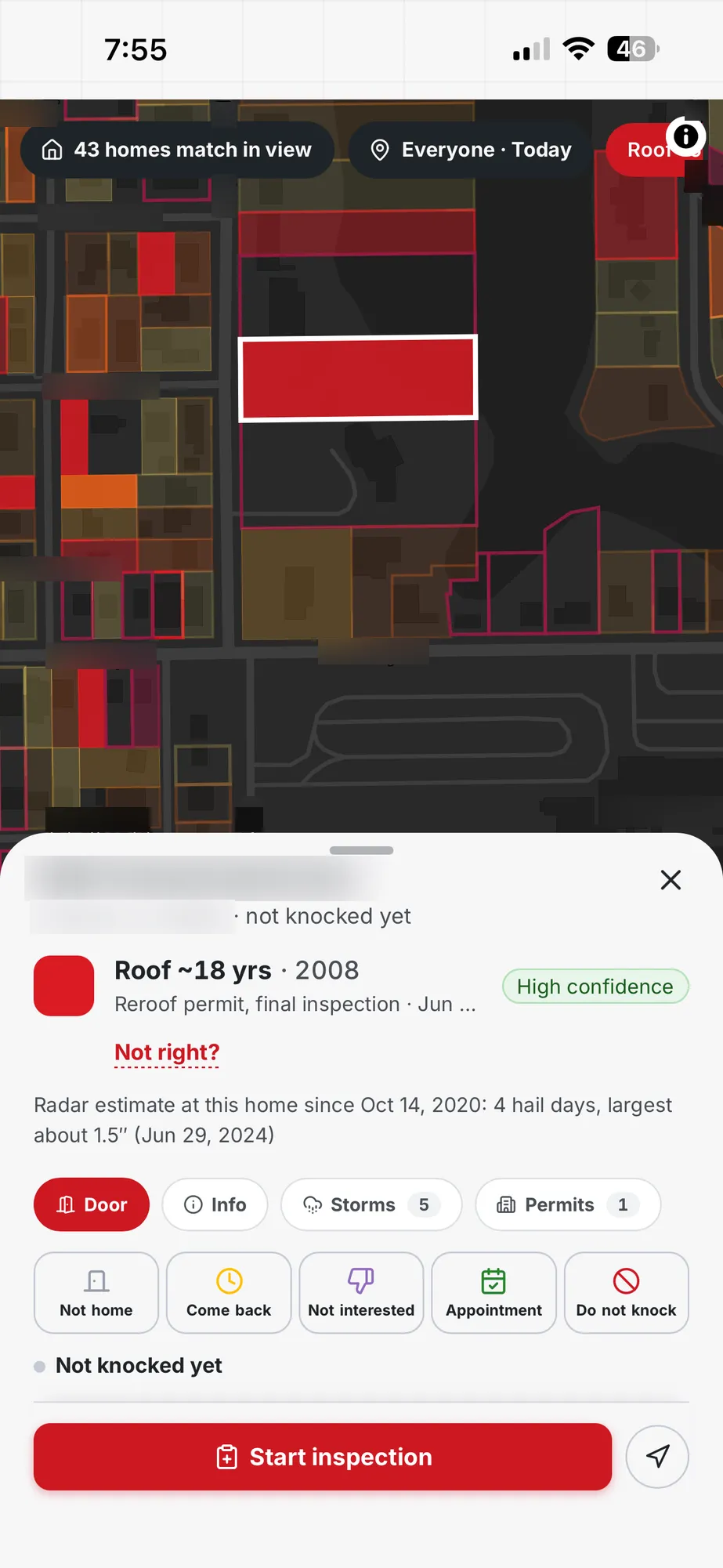
How the Door Knocking App Works
- 1
Open the map on your phone
Sign in on the phone's browser and add the page to the home screen. The phone layout puts the map first and keeps the controls under your thumb.
- 2
Narrow the street to the doors worth a knock
Click the filters for hail size, year built, wind or permits. The count at the bottom shows how many homes match in view, and the map dims the rest.
- 3
Knock, then tap an outcome
After each door, drop the pin and pick not home, come back, not interested, appointment or do not knock. Add a note if the homeowner said something worth remembering.
- 4
Start the inspection when they say yes
Turn the knocked door into an inspection on the same address. Photos and findings attach to that house, and a Pro seat produces the report.
Real-World Use Cases
See how roofing professionals use this feature in their daily work.
A Saturday crew of four
Scenario
A sales manager draws one neighborhood, filters it to homes built before 2005 that saw 1.5 inch hail in the past year, and sends four reps to different ends of the same area.
Outcome
Pins appear on the same map as each rep works. Nobody doubles back to a door a teammate already logged, and the manager sees the territory fill in from the office.
The homeowner who says come back at six
Scenario
A rep reaches a house at lunchtime and the homeowner says to return after work. The rep taps come back and adds a short note about the time.
Outcome
The pin stays on the map. At six, whoever is closest sees it and knows the conversation has already started.
The porch with a no soliciting sign
Scenario
A rep finds a no soliciting sign on a front door and marks the house do not knock before leaving.
Outcome
Every other rep sees the same flag from then on, so the household is not visited by three different people in one week.
From a conversation to a roof inspection
Scenario
A homeowner mentions last spring's hail and asks for a closer look. The rep books the visit and starts the inspection on the knocked address.
Outcome
The photos, notes and findings gather on the house that was knocked, and the report is produced from a Pro seat when the inspection ends.
A new rep's first week
Scenario
A rep with no canvassing history joins on Monday. The manager gives the rep a street, the filters and the five outcomes.
Outcome
By Friday the manager reviews the rep's knocks house by house and coaches on actual doors rather than a rep's memory of the week.
Why Choose Door Knocking App for Roofers: Pins, Outcomes, DNK?
| Aspect | With Roof Report Pro | Without |
|---|---|---|
| Remembering what happened at a door | A pin and one of five outcomes, shared with the crew | A rep's memory or a paper tally sheet |
| Houses that asked not to be contacted | Do Not Knock flag every rep sees on the map | A note one rep keeps and others never read |
| Choosing which doors to walk | Clicked filters for hail, year built, wind and permits | Driving the neighborhood and guessing |
| Reviewing a rep's day | Knock pins and a per-rep day view | Asking the rep how it went |
| Starting the inspection | Begin from the knocked address, photos attach to it | Re-enter the address in a second tool later |
| Getting started on a phone | Phone browser, added to the home screen | Waiting on a store install for every new rep |
What should a door knocking app for roofers actually do?
Most reps judge a door knocking tool in the first ten minutes of a shift. Does it load on a phone in bright sun, can a thumb hit the buttons, and does it ask for anything before the next door? Those are fair tests, and the app is built around them. The rest of the job is memory. A crew that knocks two hundred doors a day forgets most of them by dinner, and a manager who needs to know what happened on Maple Street cannot ask the street. A pin on the map and a one-tap result gives the whole team a shared record that costs a rep a second per door.
The second job is coordination. Four reps on one neighborhood overlap unless something tells each of them where the others have been. The map shows the pins as they land, so a rep working the east side sees the west side filling up and can adjust without a phone call.
The third job is the part most apps stop short of: the knock should lead somewhere. Here, a yes at the door starts an inspection on that address, which is the step that turns a conversation into work.
How do the five outcomes keep the data usable?
Every knock ends in one of five results. Not home means nobody answered. Come back means the homeowner is interested but the timing was wrong. Not interested is a clear no for now. Appointment means a visit is booked. Do not knock means the household asked not to be approached again.
Five is a small number on purpose. A long list of outcome codes slows a rep down, and a rep who is slowed down starts skipping the log. With five, the manager can read a street at a glance: a cluster of come back pins is a good evening, a cluster of not home pins at noon says the crew was early.
The outcomes are also what make the day reviewable. Knock pins can be looked at after the shift, and each rep has a day view, so coaching starts from what actually happened at actual doors. A manager does not need to ride along to see whether a rep is skipping the hard houses.
How does Do Not Knock protect the crew and the homeowner?
Some houses do not want a visit. Others carry a no soliciting sign, or the homeowner has said so already, and a second knock from a different rep is the fastest way to turn a neutral street into a hostile one.
Do Not Knock is a flag on the house, and it belongs to the whole team. One rep marks it, and every rep sees it. On the Team tab the flag stays on, so a rep cannot switch those houses off the map and walk up by accident.
The flag is a tool for courtesy, not a legal shield. Many cities and counties require a solicitor permit, set allowed hours, or ask contractors to honor no soliciting signs, and some states add rules for contractors after a storm. Check the rules where the crew works before the first shift. Roof Report Pro does not give legal advice.
How does a knocked door become an inspection?
Most roofing sales processes break at the same seam. The rep has a conversation at the door, goes back to the truck, and re-types the address into a different tool later in the day. By then the homeowner's best moment has passed.
In Roof Report Pro, the knocked door is the starting point. When the homeowner agrees to a visit, the rep starts the inspection from that address. The inspection carries the checklist photos, the notes and the findings on the house itself, and the address is already there, so there is no copy and paste. The booking side of the conversation lives in the appointment tools described on the team tracking page.
A finished report needs a Pro seat, and each paid Pro seat adds free standard reports each month, shared across the company. The report documents what was found on the roof. It does not tell a homeowner what an insurer will do. Contact your insurance company to verify coverage, deductible and policy terms.
Does the door knocking app work on a phone in the field?
The web app has a phone layout built for one hand. The map fills the screen, the filters sit in a panel a thumb can reach, and the knock outcomes are large targets rather than small menu items.
It opens in the phone's browser, and a rep can add it to the home screen so it behaves like any other app icon. That matters for a seasonal crew. A rep hired on a Friday can be knocking doors on Saturday morning without waiting on an install, an app store account or an update.
There is no store listing today. A store version is on the roadmap as coming soon, and a rollout should be planned around the browser version that exists now. Photo capture for inspections queues uploads when the signal drops, which helps on rural streets and in cellars of poor coverage.
Which houses are worth a knock?
The best door knocking app is only as good as the list of doors it points at. Roof Report Pro lets a manager narrow the map with clicked filters: year built, hail size over a chosen window, wind speed, permit history and roof age, plus property type. Hail radar history starts in October 2020. Roof dates come from permit records and today cover a small share of homes, so year built and hail usually lead the filter set. Roof material, roof shape and value filters only exist in some counties.
The map shows a live count of how many homes match in view, so a manager knows whether a territory holds forty houses or four thousand before sending anyone out. Filters are clicked, not typed, which means the rep sees exactly what is applied.
House data is live in Florida and Texas, about 20 million homes across 308 counties. Crews in other states can still use pins, outcomes and Do Not Knock on the map, and house filters follow as coverage grows. See the canvassing map page for the full filter list.
What does it cost to give a crew a door knocking app?
Roof Report Pro prices by seat. A Basic seat is $32.50 per user per month on the 12-month yearly plan billed monthly, or $39 per user per month month to month. A five-person crew on Basic is $162.50 per month on the yearly plan billed monthly. The monthly plan has no contract and can be paused or cancelled any time.
The map, pins, outcomes and Do Not Knock are part of the seat. There are no add-ons for territories or counties, and no per-state pricing. Coverage today is Florida and Texas for house data.
Reports need a Pro seat, from $79 per user per month on the monthly plan. A free trial lasts 14 days and needs no credit card, so a manager can run one crew through a real Saturday before deciding anything.
What does a seat cost?
Coverage by state
Florida, Texas
Georgia, Alabama, Tennessee
Louisiana, Oklahoma
None. One seat price whichever states you work.
How it compares
A SPOTIO alternative for roofers
How to weigh a quote-based field-sales tool against a canvassing map with a published seat price and house-level filters
A Knockio alternative for roofers
Knockio's listed seat price is lower than ours, so here is what a Roof Report Pro seat adds for a roofing company
What a typical canvassing and storm tool stack costs
Team sizes of 1, 3, 5 and 10 priced seat by seat, with the totals calculated from listed prices and a plain note on what each stack does that ours does not
Frequently Asked Questions
Who Benefits Most
Door Knocking App for Roofers: Pins, Outcomes, DNK is designed for these professionals.
Built for Roofing Contractors
Train your team with a structured inspection checklist. Close deals with professional reports that show the homeowner exactly what was found.
Built for Storm Damage Inspectors
Process high-volume storm inspections efficiently. AI identifies hail impacts, wind damage, and debris damage fast.
Ready to Get Started?
Try Roof Report Pro free with 10 reports. No credit card required.
Start Free Trial